Concrete Calculator
Enter every measurement Concrete Calculator asks for, then press Calculate. The result stays blank while you are still typing.
Press Calculate after the entries are in.
What Concrete is for
Concrete Calculator is the page to open when you need concrete from measurements you already have. It belongs with the other construction calculators because that is the work this arithmetic supports. The surface that matches this volume is the square footage. Type the entries first. The result stays hidden until you press Calculate, so a half-finished form never flashes a number you might mistake for the answer.
How to fill in this calculator
- Project. Enter the value this part of the job needs. The choices include Slab (Rectangle), Slab (Circle), Footing, Column / Pier, Wall, Curb & Gutter.
- Length. Enter the value this part of the job needs. The unit list on this field includes in, ft, yd, cm, m.
- Width. Enter the value this part of the job needs. The unit list on this field includes in, ft, yd, cm, m.
- Diameter. Enter the value this part of the job needs. The unit list on this field includes in, ft, yd, cm, m.
- Thickness. Enter the value this part of the job needs. The unit list on this field includes in, ft, yd, cm, m.
- Width. Enter the value this part of the job needs. The unit list on this field includes in, ft, yd, cm, m.
- Depth. Enter the value this part of the job needs. The unit list on this field includes in, ft, yd, cm, m.
- Diameter. Enter the value this part of the job needs. The unit list on this field includes in, ft, yd, cm, m.
- Height. Enter the value this part of the job needs. The unit list on this field includes in, ft, yd, cm, m.
- Diameter. Enter the value this part of the job needs. The unit list on this field includes in, ft, yd, cm, m.
- Height. Enter the value this part of the job needs. The unit list on this field includes in, ft, yd, cm, m.
- Length. Enter the value this part of the job needs. The unit list on this field includes in, ft, yd, cm, m.
- Height. Enter the value this part of the job needs. The unit list on this field includes in, ft, yd, cm, m.
- Thickness. Enter the value this part of the job needs. The unit list on this field includes in, ft, yd, cm, m.
The form continues past those fields, 29 inputs in all. Extra rows are for a second area, a second board, or another piece of the same kind. Leave a row blank when you do not have that piece. Use Add another only when you do.
The formula in plain language
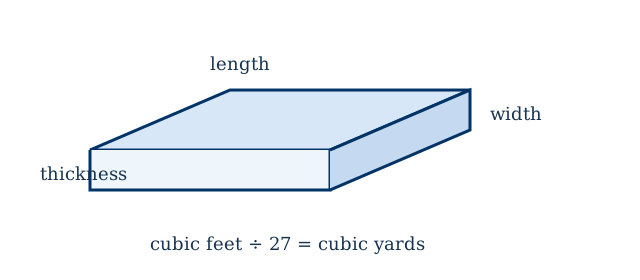
Concrete volume is length times width times thickness, all converted to feet, then divided by 27 to reach cubic yards. A circular pad uses the area of the circle times the thickness. A footing is length times width times depth, plus a stem wall if you add one. Steps are a stack of treads: the volume is the width times the rise times the run times the triangular stack of the step count. An 80 pound bag yields about 0.60 cubic feet, a 60 pound bag about 0.45, and a 40 pound bag about 0.30.
A worked example
A 10 foot by 10 foot slab at 4 inches thick is 33.33 cubic feet, which is 1.235 cubic yards. Ordering 10% extra for waste and spillage brings the order to about 1.36 yards. That slab needs 56 bags of 80 pound mix if you are not pouring from a truck.
A pour is one volume even when the shape changes. This concrete result belongs with concrete weight and footing volume before the order is called in.
Mistakes that move the answer
- Thickness is often typed in inches while length is in feet. Leave the unit on each field set to what you measured.
- A 4 inch slab is not 4 feet. That mistake orders about 12 times too much concrete.
- Bags are a last resort for a small pad. A truck load is sold by the quarter yard in many markets.
How to check the result
After Calculate shows the concrete result, redo the last operation with a pencil using the rounded figures on the screen. Matching that check means the inputs were read correctly. If you edit a label or a sentence in this HTML file, reload the page. The form and this article both live in the file, so the edit is what visitors will read.